
Checkbox Upsell: Add a Gift Box or Warranty in One Tick
TrooixHere's something most store owners never set up — and it costs them add-on sales every single day. A shopper is on your product page, ready to buy, and right there is the perfect moment to ask: "Want to add a gift box?" But there's nowhere to ask, so the question never gets asked, and the add-on never gets sold.
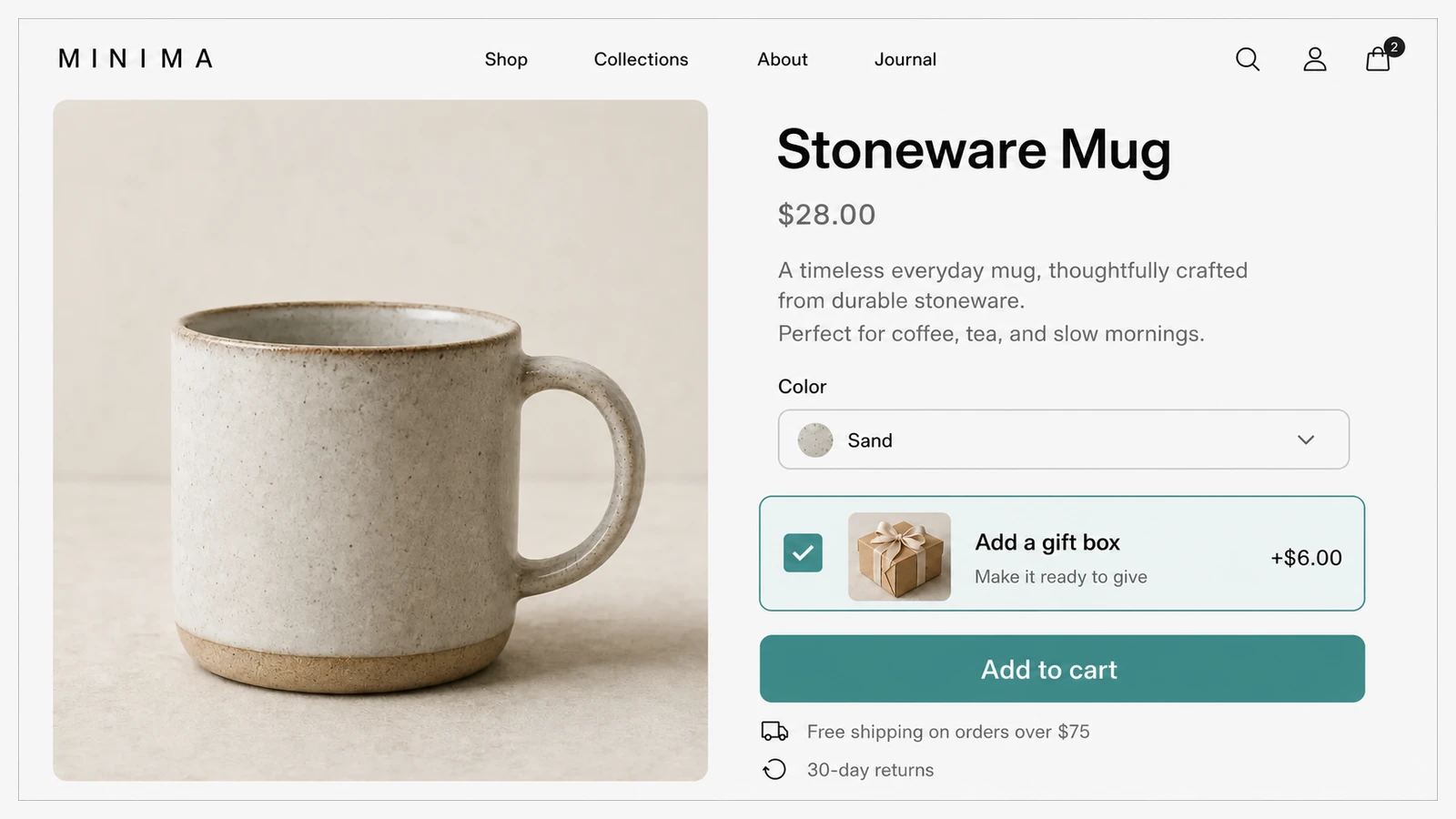
Checkbox Upsell puts a simple tick-box right under your Add to cart button. One tick, and a matching product drops into the cart alongside the main item — no extra page, no pop-up, no hunting around the store.
It's the before-purchase partner to the Thank-You Upsell, which makes its offer on the thank-you page instead. And for products people love to make their own, you can pair it with a build-your-own kit so shoppers add the matching pieces themselves.
What your customer sees
Under the Add to cart button on the product page, a small checkbox offers the add-on you've chosen — say, "Add a gift box (+$6)" or "Add a 2-year warranty." When the shopper ticks it and adds to cart, both items go in together, the add-on at its normal price. You can see it live — the gift-box tick-box sits under Add to cart on our build-your-own charm bracelet.
- Shown right where shoppers decide — under Add to cart, not buried elsewhere.
- One tick adds it — no extra clicks, no second decision.
- You see what's working — which add-ons get accepted, and on which products.
Where it earns its keep
Gift boxes, gift wrap, warranties, care kits, matching accessories, a "make it a set" upgrade — anything that naturally rides along with the main product. It's the kind of small, easy yes that adds up across hundreds of orders.
Setting it up
Describe it in plain English and Trooix builds it for your store. Then choose which product becomes the tick-box add-on and where it should appear, and match the look to your store. It goes live on your product pages right away, and you can change the offer or its styling whenever you like.
Trooix builds it for you when you describe it. Want it to behave differently — a different add-on per product, say? Describe it in plain English and Trooix builds that for you.
Questions, answered
What is a checkbox upsell?
It's a tick-box under your Add to cart button that lets a shopper add a matching product — like a gift box or warranty — to their cart in a single tick, at its normal price.
Will it slow down or clutter my product page?
No. It sits quietly under Add to cart and only adds the extra item when a shopper chooses to tick it — no pop-up, no second page.
What is Trooix?
Trooix is a Shopify app that builds the store feature you need — no developer. Describe what you want in plain English and Trooix builds it for your store, then tweak it by describing the change.
Add Trooix to Your Shopify Store
Get the exact feature your store needs — describe it in plain English and Trooix builds it for you. Install Trooix from the Shopify App Store — free to install, runs inside your Shopify admin, no developer needed.